Showing posts with label Configuration. Show all posts

Tuesday, January 12, 2021

[SOLVED] DocumentType not showing properly in Search View in IBM Sterling WMS

 In IBM Sterling WMS, sometimes in Outbound Shipment Console Search view / Inbound Shipment Console Search view / Return Shipment Console Search view or possible other search views stuck with not showing the DocumentType dropdown.


To resolve this issue, we can follow simple config as mentioned below.

Select the Sterling_Supply_Chain_Applications_Console(YFSSYS00004)

Once it is refreshed, system will show a window like below


Now, logout the Console Screen and re-login again.


That it!  

Share your comments if this helps !!


Tuesday, March 10, 2020

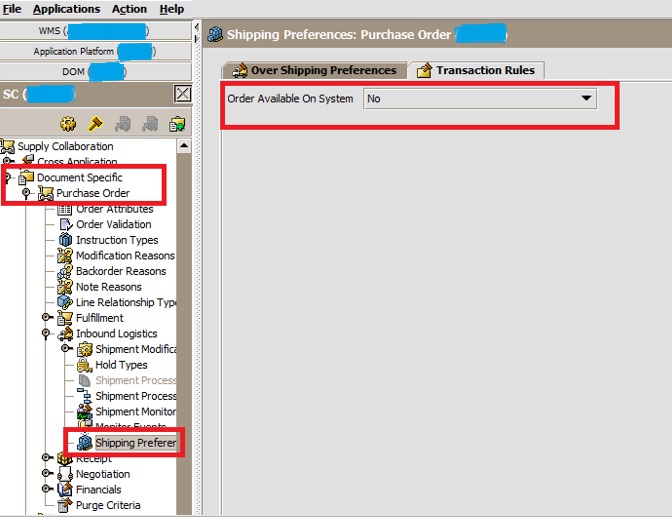
Inbound - WMS - Order Available on System - Configuration


Open WMS Configuration
Go to Applications
Select Supply Collaborations and Select Enterprise as “XYZ”


Go to PURCHASE ORDER
Go to INBOUND LOGISTIC
Select SHIPPING PREFERENCE
Go to Transaction Rules
And Select the Drop Down as No
Save Changes


Outbound - WMS - Order Available on System - Configuration


Launch WMS Configuration
Select Application - > Select Distribute Order Management


Select Enterprise as “XYZ”
Go to Document Specific ->
Select Sales Order
Select Outbound Logistic
And Select Shipping Preference
Select Transaction Rule as “NO”
Save Changes.


Saturday, June 8, 2019

Purpose of ARGUMENTS in API?

You can pass name/value pairs to the API by entering the values in the Arguments Tab. In order
for custom APIs to access custom values, the API should implement the interface
com.yantra.interop.japi.YIFCustomApi.  If entered, these name/value pairs are passed to the CustomApi as a Properties object.


Thursday, June 6, 2019

To change search view number of records in IBM Sterling WMS

200 records show in UI screen LIST page as per Default setting in yfs.properties file as per below

## PROPERTY_START
## PROPERTY_NAME: yfs.ui.MaxRecords
## DATABASE_SUPPORT: Y
## EXTENDED_PROPERTY: N
## MODIFIABLE: Y
## MODIFIABLE_AT_RUNTIME: Y
## SERVER_OVERRIDE: N
## USER_OVERRIDE: Y
## PROPERTY_GROUP: User interface
## PROPERTY_TYPE: Integer
## PROPERTY_DESCRIPTION
## The number of records displayed on a list screen. Increase the application server JVM heap
## settings if these parameters are increased. The change will affect search limits for all users.
## The default value is 200.
yfs.ui.MaxRecords=200
## PROPERTY_END


Getting error when try to increase MaxRecords in Search view ..


Default - Max Records (OOB)


To Change we can override in properties/customer_overrides.properties file and then restart Application Server (JBOSS/WebLogic/WebSphere) whichever you use.

#Max Records in List Page - Search Result
yfs.yfs.ui.MaxRecords=300

After properties change:


Popular Posts